
25 Questions to define IT Helpdesk requirements before requesting a quote

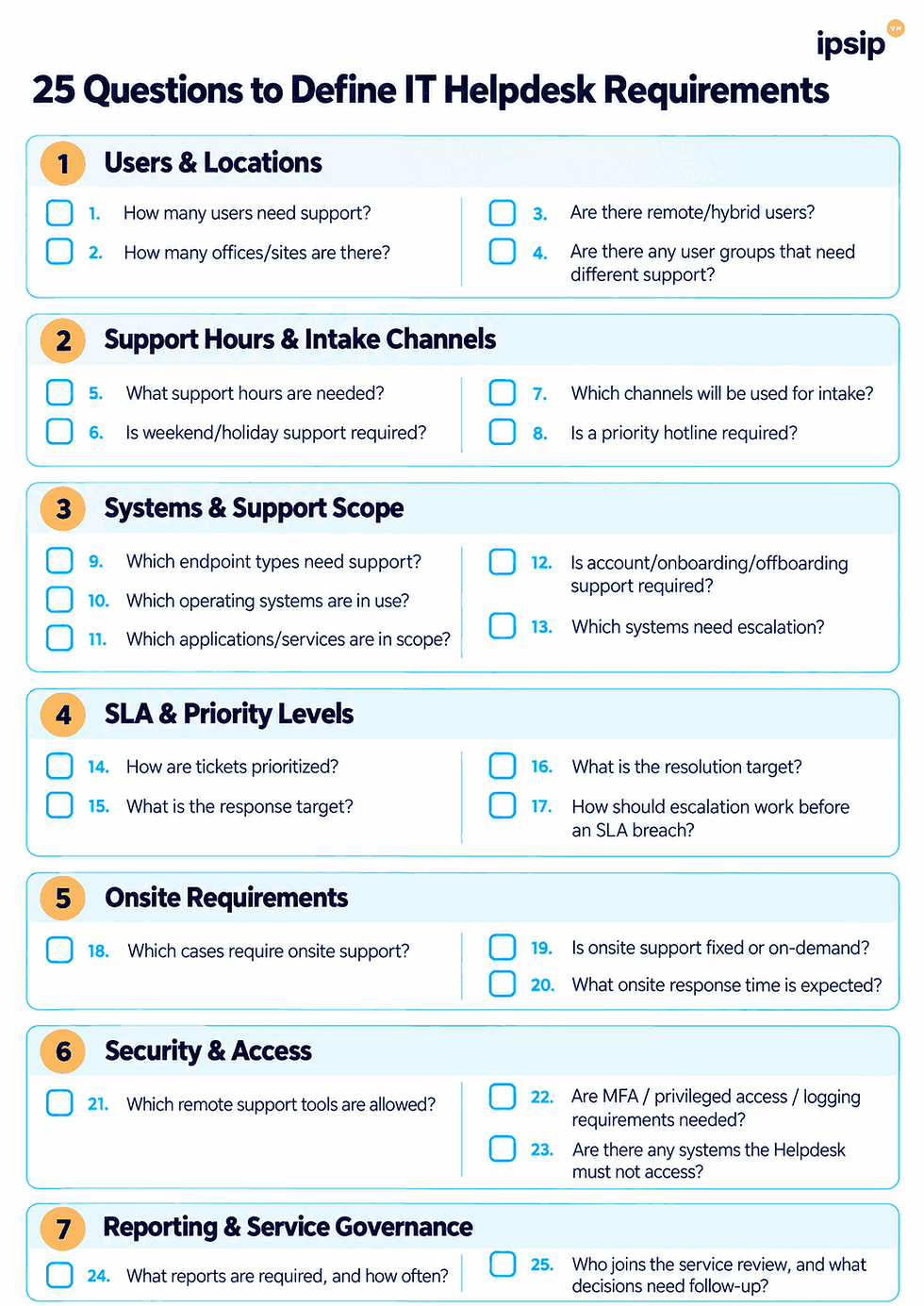
Before requesting an IT Helpdesk quote, a business should clarify at least seven requirement areas: users and locations, support hours, system scope, SLA expectations, onsite needs, security requirements, and reporting. The clearer the brief, the easier it is for vendors to propose the right service scope and price against the same baseline instead of making different assumptions.
One reason IT Helpdesk proposals are difficult to compare is that vendors are often working from different inputs.
One provider may be pricing business-hours remote support only. Another may already include onsite dispatch, after-hours coverage, escalation, or support for additional systems. If the underlying scope is different, the final price will also be different, but that does not necessarily mean one option is more expensive in practical terms.
That is why businesses should standardize a common requirements questionnaire before asking vendors to quote.

Why define IT Helpdesk requirements before requesting a quote?
The purpose of an IT Helpdesk requirements checklist is not to design the entire service internally before speaking with a provider.
Its purpose is to ensure that buyer and vendor start from the same baseline.
If scope, support coverage, systems, SLA, onsite expectations, security boundaries, and reporting are unclear, each provider may make a different set of assumptions. Two proposals may therefore look similar on the surface while actually pricing very different services.
A structured brief helps the business reduce scope gaps, identify assumptions, distinguish included items from optional items, and compare proposals more fairly.
👉If the Helpdesk scope itself is still unclear, the article on IT Helpdesk & IT Support for businesses provides a useful starting point for understanding common support responsibilities.

Group 1: Users and locations
1. How many users need support?
This should not automatically equal the total number of employees.
The business should identify who is actually in scope, for example:
all employees;
office-based staff only;
users at selected sites;
specific user groups.
User count is an important input, but it should not be used by itself to estimate staffing because workload also depends on request volume, complexity, and support scope.
2. How many offices or sites are there?
Location matters, especially if onsite support may be required.
The brief should clarify:
number of offices/sites;
cities or regions;
which sites need frequent onsite support;
which sites are primarily remote-supported.
3. Are there remote or hybrid users?
If yes, define:
approximate proportion of remote/hybrid users;
how they access corporate systems;
what devices they use;
whether the Helpdesk is allowed to remotely access endpoints.
4. Are there user groups that need different levels of support?
Examples may include:
executive users;
sales teams;
shift workers;
production users;
users of specialized applications.
Not every user group necessarily needs the same support model.
Group 2: Support hours and intake channels
5. What support hours are required?
Define whether support is needed during:
standard business hours;
extended business hours;
8x5;
12x5;
24x7.
Broader coverage usually changes staffing and escalation design.
6. Is weekend or holiday support required?
This should not be left as an assumption.
If the business operates outside standard working days, specify which types of incidents or requests must still be supported.
7. Which channels will users use to submit requests?
Possible channels include:
portal;
email;
hotline;
chat;
collaboration tools.
Atlassian includes customer channels, SLA, reporting, and permissions among the areas organizations may review when evaluating a service desk. This is not a universal mandatory standard, but it is a useful practical example of why intake channels should be defined as part of service design.
8. Is a priority hotline required for certain users or incidents?
Examples may include:
P1 incidents;
executive support;
production outages;
critical login failures.
This helps define how priority intake and escalation should work.
Group 3: Systems and support scope
A requirement such as “support all IT” is usually too broad for accurate scoping.
9. Which endpoint types need support?
Examples may include:
desktops;
laptops;
mobile devices;
printers;
scanners;
meeting-room devices;
specialized endpoints.
10. Which operating systems are in use?
For example:
Windows;
macOS;
mixed environments.
If Linux workstations or specialized devices exist, they should be listed separately.
11. Which applications and services are in scope?
Examples may include:
Microsoft 365;
Outlook;
Teams;
VPN;
browser support;
CRM;
ERP client;
collaboration tools;
line-of-business applications.
There is no need to list every installed application, but the business should identify which systems the Helpdesk is actually expected to support.
12. Does the Helpdesk need to support account access and onboarding/offboarding?
Clarify whether the Helpdesk is expected to:
reset passwords;
unlock accounts;
create users;
assign access;
support onboarding;
support offboarding;
coordinate with HR or internal IT.
13. Which systems should be escalated to internal IT or another vendor?
This question defines the responsibility boundary.
For example:
the Helpdesk may provide Level 1 support for ERP while backend issues go to the ERP vendor;
core network issues may remain with internal IT;
security incidents may go to the SOC;
server issues may go to the infrastructure team.
👉 For organizations that already have internal IT, the article Should businesses with an internal IT team still outsource IT Helpdesk? explains this division of responsibilities in more detail.

Group 4: SLA and priority levels
14. How should tickets be prioritized?
The business may use:
P1/P2/P3/P4;
Critical/High/Medium/Low;
another internal model.
The important point is that priority should reflect business impact and urgency.
15. What response targets are expected?
Response targets may vary by priority or request type.
16. Does the business require resolution targets or only tracking targets?
Not every ticket is fully within the Helpdesk’s control.
Some cases may depend on:
third-party vendors;
user availability;
approvals;
hardware replacement;
external systems.
That is why the scope should distinguish direct resolution responsibility from coordination responsibility.
17. How should escalation work before an SLA breach?
Clarify:
who should be notified;
when Level 2 or Level 3 should be engaged;
whether pre-breach alerts are required;
who owns the issue until closure.
In Jira Service Management, SLA goals are configured through time targets together with conditions and calendars, and goals can differ depending on criteria such as priority. This is a useful example of why a brief should define specific SLA targets instead of simply asking for “good SLA performance.”
👉 For more detail on response targets, resolution targets, and SLA structure, see IT Helpdesk SLA

Group 5: Onsite requirements
18. Which situations require onsite support?
Avoid writing only “onsite when needed.”
Define clear triggers, such as:
hardware issues;
meeting-room problems;
users who cannot be supported remotely;
network-access issues at a site;
onboarding hardware setup.
19. Is onsite support fixed or on-demand?
Possible models include:
resident engineer;
scheduled visits;
on-demand dispatch;
hybrid models.
20. What onsite response time is expected?
For example:
same day;
next business day;
priority-based response.
The clearer the onsite requirement, the easier it is for vendors to separate recurring onsite effort from ad hoc dispatch.
Group 6: Security and access
Security requirements should not be left until after the contract is signed.
21. Which remote-support tools are allowed?
If the business already has mandatory tools or policies, specify them upfront.
Microsoft recommends considering items such as device and platform support, tenant configuration, Conditional Access, RBAC, network requirements, and limitations when planning Remote Help.
22. Are there MFA, privileged-access, or logging requirements?
The Helpdesk should not automatically be assumed to have full administrative rights.
Microsoft Remote Help guidance recommends least privilege, role-based access controls, and the option to require MFA or compliant devices through Conditional Access. It also provides logging and session-related information for remote-support activity.
The brief may therefore clarify:
whether support staff use named or shared accounts;
whether Level 1 has view-only or control rights;
when elevation is allowed;
whether MFA is mandatory;
whether session logging or audit records are required.
23. Are there systems or data the Helpdesk must not access?
Examples may include:
payroll;
finance systems;
security consoles;
privileged infrastructure;
sensitive file shares.
The clearer the security boundary, the lower the risk of both parties interpreting support rights differently.
Group 7: Reporting and service governance
24. What reports are required, and how often?
Possible reporting items include:
SLA/KPI reports;
backlog;
top issues;
recurring problems;
monthly service reports;
incident summaries;
action trackers.
Not every business needs every report. The important point is to define which reports support actual decisions.
25. Who joins the service review, and what decisions need follow-up?
Clarify:
who receives reports;
who joins the review;
who approves actions;
who owns recurring issues;
how actions from the previous period are followed up.
PeopleCert separates practices such as Measurement and Reporting, Service Level Management, Relationship Management, and Supplier Management within ITIL, reinforcing that reporting and supplier governance go beyond simply producing numbers.
What should the IT Helpdesk brief look like after answering the 25 questions?
After completing the questionnaire, the business does not need to create a long technical specification.
The answers can be consolidated into a simple brief:
Information Group | What to Define |
Users | User count, special user groups, remote/hybrid |
Locations | Offices/sites, onsite locations |
Coverage | Support hours, weekends, after-hours |
Systems | Endpoints, OS, applications, accounts |
SLA | Priority, response, resolution, escalation |
Onsite | Trigger, model, expected response time |
Security | Remote access, privilege, restrictions |
Reporting | KPI, monthly report, service review |
This gives vendors a common baseline for discovery and proposal development.
How do these 25 questions help businesses compare vendors?
When every vendor receives the same input, the meaningful differences between proposals become easier to see.
The business can compare:
whether the vendor understood the scope correctly;
which assumptions are excluded;
whether onsite support is included;
whether after-hours support is included;
whether SLA definitions are comparable;
which systems are directly supported;
which systems are only coordinated or escalated;
whether reporting is included;
whether security requirements are addressed.
Two proposals are only truly comparable when scope, coverage, SLA, and responsibility boundaries are sufficiently aligned.
👉 This article is therefore not a pricing guide. Its purpose is to help the business standardize the input before moving into pricing discussions.
How does IPSIP Vietnam help businesses define IT Helpdesk requirements?
A business does not need to answer all 25 questions at a highly technical level before starting a discussion with a provider.
What matters first is understanding the current operating environment, the users who need support, the main systems, required support hours, and the issues the business wants to improve.
From that starting point, IPSIP Vietnam can work with the business to review:
support scope;
responsibility boundaries with internal IT;
Remote/Onsite requirements;
SLA;
escalation;
security boundaries;
reporting requirements.
For companies that already have an internal IT team, outsourced Helpdesk support does not necessarily need to replace existing staff. The scope can be structured so that the provider handles Level 1 and repetitive requests while internal IT continues to focus on infrastructure, applications, security, and more specialized technical work.
Businesses can review IPSIP Vietnam’s IT Helpdesk & IT Support service to understand the service scope before finalizing their requirements checklist.
If a business is preparing to request an IT Helpdesk quote, a practical next step is to complete the questionnaire in this article or use it as a checklist during the discovery session. Once scope, coverage, SLA, and responsibility boundaries are clearer, IPSIP can work with the business to shape a support model and quotation around the actual operating environment rather than applying the same fixed scope to every organization.

For businesses preparing to purchase the service, an IT Helpdesk requirements checklist is therefore more than an information-gathering document. It is the first step in turning operational needs into a scope that can be assessed, compared, quoted, and implemented.
References


