
C3RB3R Ransomware targets synology NAS: Signs, patches and recovery

Updated October 30, 2026. Based on public vendor advisories, security research and community incident reports available at the time of review.
Synology NAS owners should review their DSM security updates following reports of C3RB3R ransomware infections. On October 29, Synology confirmed that attackers were exploiting a previously patched vulnerability against devices running outdated DSM versions to encrypt data and demand payment.
For administrators, the immediate response depends on the device’s condition. Systems without signs of compromise need patching and exposure reduction. Systems already experiencing encryption need containment, evidence preservation and a recovery assessment before routine maintenance.
What is C3RB3R ransomware?
Security firm 360 identifies C3RB3R as a Cerber ransomware variant and says its response team has received multiple requests for help involving Synology NAS devices since October 2026.

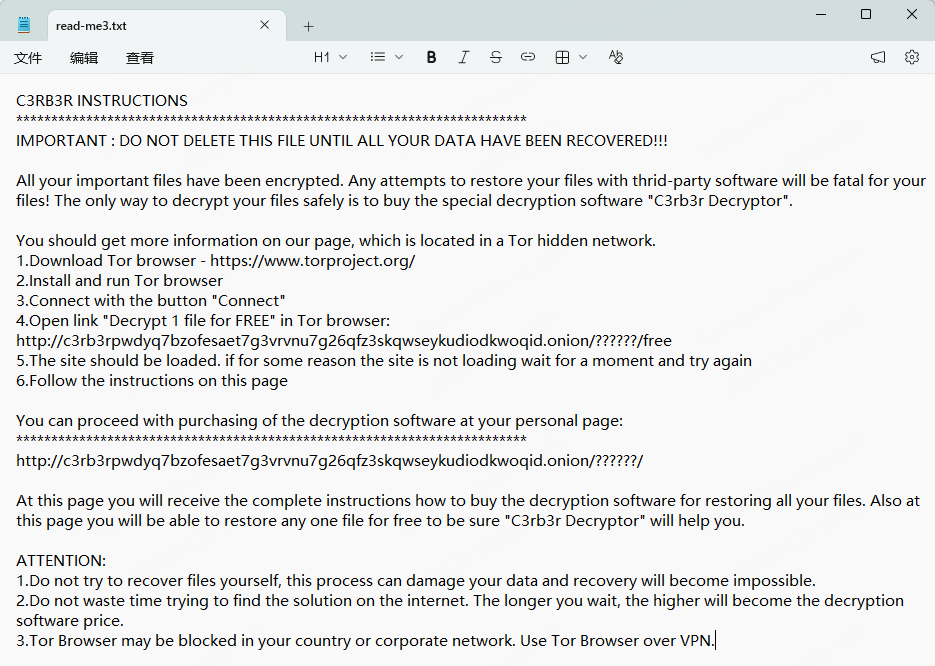
The sample analyzed by 360 encrypts files, adds the .L0CK3D extension and places a ransom note named read-me3.txt in affected directories. The extension uses a zero, rather than the letter O. Its encryption combines ChaCha8 with RSA-2048, with different encryption strategies depending on file characteristics.
These indicators are useful investigative leads. Confirming the variant still requires examining the ransom note, affected files and other evidence.

What has Synology confirmed?
Synology’s October 29 statement attributes the attacks it identified to a vulnerability patched in December 2024. It directs customers to Synology-SA-24:20, urges affected users to update DSM and recommends automatic updates. The statement does not publish a worldwide victim count or establish the entry route for every publicly reported incident. [1]
SA-24:20 includes CVE-2024-10441, a critical remote code execution vulnerability in the system plugin daemon, rated CVSS 9.8. [3]
DSM patch thresholds for SA-24:20
DSM branch | Fixed release listed in the advisory |
7.2.2 | 7.2.2-72806-1 or later |
7.2.1 | 7.2.1-69057-6 or later |
7.2 | 7.2-64570-4 or later |
7.1 | 7.1.1-42962-7 or later |
6.2 | 6.2.4-25556-8 or later |
These thresholds address the advisory as a whole. The listed branches do not necessarily share every vulnerability or severity classification. They are historical patch minimums, rather than a recommendation to stop updating at those versions.
Why do some reports cite different vulnerabilities?
360 attributes the incidents it investigated to CVE-2026-13639 and CVE-2026-13684, addressed by Synology in September 2026. That attribution should be presented as 360’s finding, separately from Synology’s October statement.
Synology’s SA-26:13, published September 18, confirms that these two critical vulnerabilities can allow remote attackers to read or write arbitrary files and cause denial of service. Both carry CVSS 9.8 scores.
DSM branch | Fixed release listed in SA-26:13 |
7.4 | 7.4-90075 or later |
7.3 | 7.3.2-86009-4 or later |
7.2.2 | 7.2.2-72806-9 or later |
7.2.1 | 7.2.1-69057-12 or later |
The practical recommendation is to check all applicable advisories and install the current supported updates for the specific model. Meeting one advisory’s threshold does not establish protection against unrelated vulnerabilities.
Editorial assessment: The available accounts describe different suspected or identified entry routes. They do not establish that every C3RB3R incident follows one exploit chain, or prove that an undisclosed zero-day is responsible.
What to do if your NAS is already affected
1. Isolate the NAS and stop further damage
Disconnect affected systems from the network and assess connected storage and other potentially compromised devices. Network isolation limits external access and spread, but does not itself stop an encryptor already running locally.
CISA’s ransomware response guidance prioritizes isolation and warns that powering down a device destroys volatile evidence. Its checklist recommends shutdown when the device cannot otherwise be disconnected from the network. Coordinate containment with an incident responder so encryption can be stopped while preserving useful evidence where possible.
2. Assess memory preservation before rebooting
The community project c3rb3r-rescue documents a recovery approach involving key material obtained from memory. Its authors explicitly limit the tools to the analyzed sample and file format: this is not a universal C3RB3R decryptor. They also warn that rebooting, upgrading or terminating the relevant process before evidence collection may destroy recovery material.
This does not mean leaving encryption running. A qualified responder should assess how to halt further encryption and preserve memory safely. The documented virtual-machine recovery does not establish that the same capture method will work on every physical NAS.
3. Preserve the incident record
Record the discovery time, DSM version, installed packages, network exposure and actions already taken. Preserve the ransom note and relevant logs. Synology recommends contacting its support team or appropriate incident response specialists to investigate the cause and plan recovery.
Avoid treating an operating-system update as a complete cleanup or file-recovery procedure.
4. Evaluate backups and specialist recovery options
A community incident report describes recovering some original data from Btrfs copy-on-write remnants after C3RB3R encryption. This is a case-specific, self-reported result, rather than a recovery guarantee.
If that avenue is being assessed, preserve encrypted files and avoid unnecessary writes, defragmentation or Btrfs balance operations on the source volume. Recovery output should go to separate storage. Work from preserved copies where possible and let a specialist determine whether the filesystem state supports recovery.
How to reduce exposure before an incident
Synology’s prevention guidance recommends keeping DSM and packages updated, minimizing internet-facing services, using a VPN for remote file access, enabling multifactor authentication and applying appropriate firewall restrictions. It also recommends offline backups and regular restoration tests.
For backup planning, Synology describes the 3-2-1 strategy: maintain three copies of the data, use two storage media and keep one copy offsite. Its guidance also notes that copies stored on the same NAS remain exposed to some of the same storage failures.
For a business, the operational goal is a tested recovery path that remains available if the production NAS and its administrative accounts are compromised.
----------
Frequently asked questions
Can I recover a file by removing the .L0CK3D extension?
Renaming a file does not reverse the content encryption described in 360’s analysis. Preserve the original encrypted file for investigation and recovery attempts.
Is there a free decryptor for every C3RB3R victim?
The reviewed sources do not establish a universal solution. The c3rb3r-rescue project says its published recovery material has been verified only for its documented incident, with no evidence of success across victims.
Will the CERBER V1 tool on No More Ransom work?
No More Ransom lists a tool for CERBER V1. That listing does not establish compatibility with the NAS-targeting C3RB3R variant. Verify the exact variant and tool instructions before attempting recovery on copies.
Does updating DSM decrypt existing files?
The cited security advisories describe vulnerability fixes, not file decryption. Already compromised systems require a separate containment, cleanup and recovery process.
-----
Referral
Reporting scope: public sources reviewed for an international readership. No verified worldwide victim total, country-by-country distribution, aggregate financial loss or general recovery success rate is asserted. Publication dates and patch thresholds are stated explicitly because this incident is evolving.


