How to calculate IT Helpdesk pricing: A comparison of 4 common pricing models

Two businesses both have 50 employees and similar IT support needs, but might receive very different IT Helpdesk quotes? The reason lies not only in the unit price but also in how the provider determines the number of users, devices, support requests, and the scope of work.
Understanding how IT Helpdesk pricing is calculated helps businesses compare quotes more accurately, budget properly, and minimize unexpected incurred costs.
There are currently four common pricing models: per-user, per-device, per-support request, and a recurring fixed fee. No single model is always the cheapest or suitable for every business. The choice must be based on the operational scale, frequency of requests, infrastructure characteristics, and the desired level of support.
What factors affect how to calculate IT Helpdesk pricing?
IT Helpdesk costs are not simply the amount a business pays to have technicians resolve computer issues. Quotes often depend on the workload, complexity, and responsibilities the provider undertakes.
Among these, the unit of billing is the first important factor.
One provider may charge based on the number of supported employees. Another provider may charge based on the number of computers, servers, or devices within the management scope. Some units charge for each arising request or collect a fixed monthly fee.
Besides the unit of billing, businesses need to consider:
Support scope: Only supporting computers and office applications, or including accounts, networks, servers, and other systems?
Support format: Remote support, direct support at the office (Onsite), or a combination.
Service hours: Business hours, after-hours, weekends, or 24/7.
Service commitments: Receiving, responding, escalating times, and incident resolution targets according to the SLA.
Service limits: Number of requests, support hours, onsite visits, and out-of-scope work.
Business characteristics: Number of branches, geographic distribution, systems in use, and level of dependence on IT.
Two quotes both calculated per user can still differ significantly if one only provides remote support during business hours, while the other includes onsite support and stricter incident resolution commitments.
Businesses need to determine the IT Support scope of work for businesses before comparing costs. This is the basis for evaluating whether the fee is commensurate with the volume and quality of service.

Comparing 4 popular IT Helpdesk pricing models
1. Per-user pricing
This is a pricing model based on the number of supported users in a billing period, typically monthly.
Reference formula:
Recurring cost = Number of billable users × Unit price/user.
For example, a business with 50 employees within the support scope will be quoted based on 50 users, instead of being charged separately for each arising request.
Advantages:
Easy to estimate the budget when the number of employees is relatively stable.
Suitable for office environments where employees use multiple applications and devices.
Convenient to adjust the scale when the business recruits or changes personnel.
Reduces the need to separately track the cost of each ticket if the contract already includes standard requests.
Limitations and risks:
The fee does not necessarily decrease when some employees rarely use the service. Furthermore, each provider may define a billable user differently.
For instance, seasonal employees, shared accounts, or employees using multiple computers may be subject to separate billing conditions.
Businesses need to clarify exactly how many devices a supported user can have, whether there is a ticket limit, and when the cost is adjusted if an employee resigns.
Suitable for: Office businesses, service companies, organizations with a stable number of personnel and a need for regular IT support.
2. Per-device pricing
This model determines the cost based on the number of devices within the support or management scope.
Reference formula:
Recurring cost = Total support cost for device groups.
If all devices apply the same unit price, the cost can be calculated by the number of devices multiplied by the corresponding unit price. In reality, workstations, servers, and network devices may have different fee levels.
For example, a business has 40 employees but owns 65 computers, printers, and shared devices. The quote can be based on the agreed-upon list of devices instead of the number of employees.
Advantages:
Aligns costs with the scale of supported IT assets.
Suitable for environments with many shared devices.
Easy to define the management scope if the business has a complete IT asset inventory.
Limitations and risks:
Costs may increase when the business adds devices, even if the number of employees remains unchanged.
An employee using a desktop and a laptop could cause the business to pay fees for both devices. Printers, servers, network devices, or specialized equipment may also be billed differently.
Additionally, device support does not automatically equate to supporting all accounts, software, and user needs.
Suitable for: Manufacturing businesses, retail, operations centers, or organizations with many shared devices and a need to clearly manage the asset inventory.
3. Per-ticket pricing
In this model, the business pays based on the number of IT support requests recorded and billed.
A ticket is a request created on the support management system, which can relate to a computer issue, email error, permission request, or software installation.
Reference formula:
Cost = Number of billable tickets × Unit price/ticket.
Some providers may classify tickets by complexity level or apply different unit prices for certain groups of requests.
Advantages:
Suitable when the business does not need regular support.
Costs are relatively directly tied to the number of arising requests.
No need to maintain a large fixed fee when support needs are low.
Limitations and risks:
The biggest weakness is that the budget is difficult to forecast when the volume of requests fluctuates.
During a normal operating month, the business may only generate a few tickets. However, system outages, personnel changes, or new software deployments can cause the number of requests to increase significantly.
Businesses must also clarify how tickets are calculated: is an incident affecting multiple employees counted as one or multiple tickets? Is a reopened ticket charged again? Do requests escalated to specialized engineers incur additional fees?
Suitable for: Small businesses, those with basic internal IT staff, or those only needing supplementary support for infrequent requests.
4. Recurring fixed fee (Retainer)
With this model, the business pays a fixed monthly or contract-period fee to receive services within the agreed scope.
Reference formula:
Total cost = Recurring fixed fee + Overage fee + Out-of-scope costs.
The fixed fee may include a set number of support hours, number of tickets, system scope, or specific operational responsibilities. Some contracts apply a broader support mechanism but still have exclusion conditions.
Advantages:
Easy to plan the budget.
Can be suitable for continuous support needs.
Convenient to agree upon the service scope and long-term responsibilities.
Reduces the workload of approving costs for individual standard requests.
Limitations and risks:
A fixed fee does not mean unlimited support.
If the contract only includes a certain number of hours or specific job groups, the business may still have to pay extra when exceeding the quota or requesting out-of-scope services.
Therefore, it is necessary to clearly define the benefits, conditions for incurring fees, and how to change the package when the business scale increases or decreases.
Suitable for: Businesses with continuous support needs, wanting to control periodic budgets, and needing providers to maintain clear operational responsibilities.
Table comparing 4 IT Helpdesk pricing models
Criteria | Per-user | Per-device | Per-request | Fixed fee |
Unit of measurement | User | Device | Ticket | Service scope per period |
Budget estimation | Easy when personnel is stable | Easy when the number of devices is stable | More difficult when tickets fluctuate | Relatively stable |
Main risks | Infrequent users are still charged | Many devices increase costs | Many tickets arise | Exceeding the quota |
Best suited for | Offices with many employees | Many devices, shared devices | Low support needs | Continuous needs |
Needs checking | User and device limits | Device inventory | Ticket calculation rules | Scope and conditions for exceeding the package |
The above table is a reference framework, not a price list or default policy applied by any provider.
Why might a model with a lower unit price not necessarily be more economical?
A common mistake when comparing IT Helpdesk quotes is to only look at the unit price while ignoring the total cost of using the service.
For example, Provider A quotes a low price per ticket but charges extra when handling after-hours requests, direct support, or expert escalations. Provider B has a higher recurring fee but already includes a portion of these tasks.
If only comparing the initial fee, the business might inaccurately evaluate the optimal option.
To determine the total cost, three groups must be considered:
Base costs: Fees per user, device, ticket, or a committed fixed rate.
Incurred costs: Overage fees, onsite, after-hours, emergency support, initial deployment, or contract scope changes.
Indirect operational costs: Employee waiting time, effort coordinating with the provider, and internal IT resources that must still be maintained.
Not all indirect costs are easily convertible to money. However, businesses should consider them when choosing an option, especially if IT incidents can significantly impact business operations.
According to the analysis article 4 Key MSP Pricing Models Explained by Managed Solution, evaluating the pricing model for managed IT services requires considering usage needs, service delivery times, and the ability to observe the scope of work, rather than just focusing on the unit price. This is a helpful perspective when businesses read IT Helpdesk quotes, even though the specific Helpdesk scope may be narrower than comprehensive managed IT services.
How are Onsite, After-hours, and 24/7 support costs calculated?
Aside from the main pricing model, three factors that can create significant differences between quotes are direct support, service hours, and SLA commitments.
Direct support at the office (Onsite)
Onsite is a format where a technician visits the business's location to handle tasks requiring direct interaction.
Depending on the contract, onsite costs can be calculated per visit, per hour, per workday, or include a specific quota.
Businesses need to verify travel fees, support areas, arrival times, and conditions for incurring costs when extra visits are needed.
Notably, a remote support contract does not automatically include onsite services.
After-hours and 24/7 support
Support during business hours usually has a clear time frame. If the business operates in the evenings, on weekends, or around the clock, a corresponding support plan must be agreed upon.
The point to distinguish is that 24/7 support does not necessarily mean every request will be resolved immediately, at every location.
A provider may receive tickets 24/7 but only directly handle certain groups of incidents within a specific time frame. Less urgent requests may be deferred to the next business hours as agreed.
How does the SLA affect quotes?
Strictly speaking, this agreement may demand higher personnel capacity, shifts, or backup resources, thereby affecting costs.
Businesses can refer to the article IT Helpdesk SLA: The foundation for 99.9% uptime and seamless operations to better understand the commitments to evaluate before signing a contract.
5 steps to compare IT Helpdesk quotes before selecting a vendor
To avoid choosing the wrong option simply due to an attractive unit price, businesses should convert quotes into the same use case.
Assume a company has:
50 employees needing IT support.
65 devices within the usage scope.
An average of 35 tickets per month.
A main office and a need for onsite support when necessary.
Service hours primarily during business hours.
This is an illustrative scenario, not actual customer data or an IPSIP Vietnam quote.
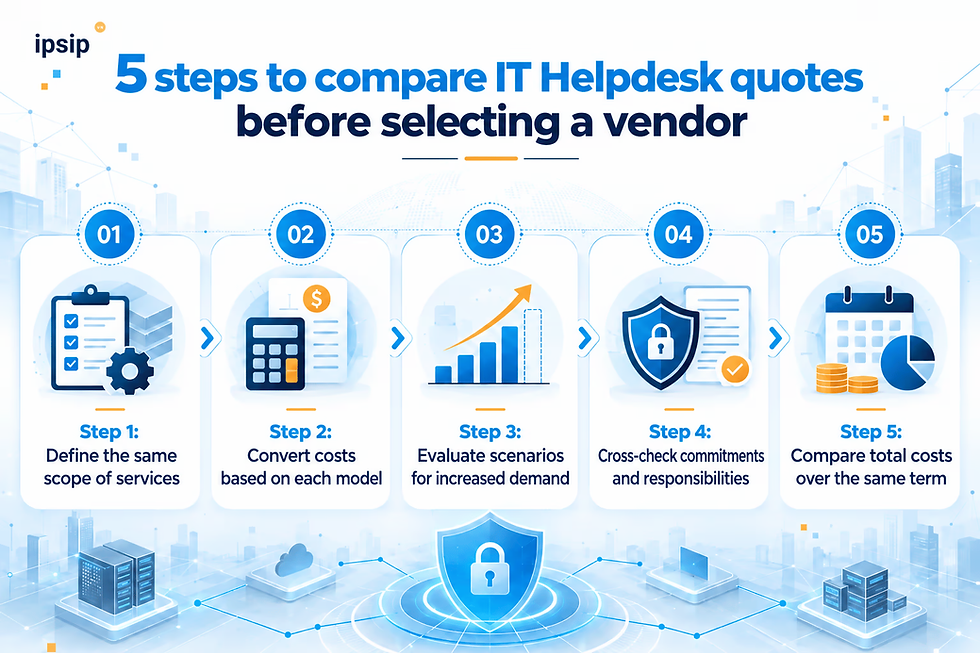
Step 1: Define the same scope of services
Two quotes need to cover the same group of tasks, for example, supporting computers, email, office software, accounts, and basic network connections.
If one party includes server administration or deep security while the other does not, the business needs to separate those items before comparing.
Step 2: Convert costs based on each model
For the hypothetical business:
Per-user: 50 × Unit price/user/month.
Per-device: Total support fee for 65 devices by group.
Per-ticket: 35 × Unit price/ticket, after considering classification rules.
Fixed fee: A recurring fee based on the committed scope.
These calculations only reflect base fees. Next, it is necessary to add unincluded items such as onsite, after-hours, service initialization, or overage fees.
Step 3: Evaluate scenarios for increased demand
Do not just calculate costs for a normal operating month.
Evaluate cases where the number of tickets increases, devices expand, or the business hires more employees.
For instance, if the ticket volume jumps from 35 to 60 per month, the total cost of the per-request model can change significantly. With a fixed fee model, check whether the added requests exceed the contract limit.
Step 4: Cross-check commitments and responsibilities
A complete quote must clarify which party receives, handles, approves, escalates, and takes responsibility for each group of tasks.
If the business still has an internal IT team, it must distinguish which requests are performed by internal personnel and which are forwarded to the provider.
Businesses can refer to the RACI matrix between businesses and IT Helpdesk vendor to build a more transparent responsibility assignment.
Step 5: Compare total costs over the same term
After standardization, the business should cross-check the estimated total costs for the same period, such as 12 months, including the recurring fee, initial deployment costs, and predictable incurred costs.
The goal is not to find the provider with the lowest unit price, but to find an option that fully meets the needs with reasonable costs and controllable contract conditions.
Which IT Helpdesk pricing model should businesses choose?
The appropriate choice depends on operational characteristics rather than just the business scale.
Office businesses with a stable number of employees: The per-user model is worth considering as it is easy to budget. However, policies regarding seasonal employees and users with multiple devices must be checked.
Businesses with many shared devices: The per-device model might be more suitable, especially when the support scope is tied to the IT asset inventory.
Businesses with infrequent IT requests: The per-ticket model can help limit recurring fees, provided that the cost of handling sudden requests and severe incidents has been evaluated.
Businesses needing regular support: The fixed fee model may be suitable to maintain a stable budget and build clear service commitments.
In reality, businesses can also consider a hybrid model. For example, a fixed fee for remote support and regular requests, accompanied by a separate fee for onsite or after-hours support.
A hybrid model is especially worth considering when the business already has IT staff but needs supplementary resources to handle tickets, support users, or receive requests when the internal team is overloaded.

Frequently asked questions when receiving IT Helpdesk quotes
1. If an employee uses multiple devices, should they be billed per user or per device?
If an employee uses a laptop and a desktop, the per-user model might be more convenient, provided the contract includes both devices. However, the provider may limit the number of supported devices per account. This condition must be verified before comparing costs.
2. Does 24/7 IT Helpdesk service always include onsite support?
No. A fixed fee is usually tied to a scope of work and specific conditions. Some contracts may stipulate limits on hours, tickets, onsite visits, or exclude specialized tasks. Businesses need to check how fees are calculated when quotas are exceeded.
3. Does 24/7 IT Helpdesk service always include onsite support?
Not necessarily. 24/7 support may only apply to request reception or remote support. The onsite scope, arrival times, and after-hours costs must be specified separately in the contract or SLA.
IT Helpdesk & IT Support services from IPSIP Vietnam
IPSIP Vietnam provides IT Helpdesk & IT Support services for businesses with remote and direct office support formats according to the agreed scope. Businesses can choose to outsource or coordinate with an internal IT team, with support conditions and SLAs defined based on operational needs.

In conclusion, the most suitable IT Helpdesk pricing method is the one that helps the business estimate the total cost and receive the exact necessary support scope.
Per-user billing is convenient for office environments; per-device suits businesses with many IT assets; per-request is appropriate when support needs are infrequent; and a recurring fixed fee offers the advantage of budget planning.
A transparent quote should show not only how much the business has to pay, but also what it will receive and what situations might cause costs to change.
References:
Managed Solution - 4 Key MSP Pricing Models Explained
Datapath – Managed IT Services Pricing & MSP Cost Guide