
Onboarding an IT Helpdesk Service in 30 Days: Data, Access, and Acceptance Milestones

IT Helpdesk onboarding can be structured around a four-week roadmap: discovery and inventory, access and service setup, knowledge transfer and testing, followed by go-live and hypercare. However, 30 days should be treated as a reference framework rather than a guaranteed timeline for every business. The actual schedule depends on data readiness, access approvals, system scope, number of sites, internal IT dependencies, and the acceptance criteria agreed before go-live.
For businesses considering outsourced IT Helpdesk services, one of the most important questions after selecting a provider is:
“What happens after the contract is signed, and how do we transition without disrupting operations?”
This is why onboarding should not be treated as simply handing over a user list, creating a few accounts, and starting to receive tickets.
A real transition often needs to address several areas at the same time: user data, device and application inventory, permissions, SLA, knowledge, escalation, reporting, and the responsibility boundary between the provider and internal IT.
ServiceNow’s implementation methodology separates activities such as planning, testing, operational readiness, training, go-live, handover, and hypercare instead of treating go-live as the single end point of implementation.
Why should IT Helpdesk onboarding not start with “Create accounts and go live”?
A Helpdesk team may already have login access and still not be ready to support users.
If the team does not know which systems are in scope, when to escalate, who owns each application, or which users require different support treatment, broader access will not solve the underlying problem.
Before go-live, both parties should clarify at least:
user groups in scope;
locations and support hours;
endpoints and applications in scope;
ticket intake channels;
priority and SLA;
access permissions;
responsibility boundaries with internal IT;
vendor dependencies;
knowledge and SOPs;
reporting and governance.
If the business is still defining what the Helpdesk should own, the article on IT Helpdesk & IT Support for businesses provides useful context before building the onboarding roadmap.

How should a 30-day IT Helpdesk onboarding roadmap be structured?
A practical 30-day onboarding framework can be divided into four stages:
Week 1 – Discovery & Inventory
Week 2 – Access Control & Service Setup
Week 3 – Knowledge Transfer & Testing
Week 4 – Go-live & Hypercare
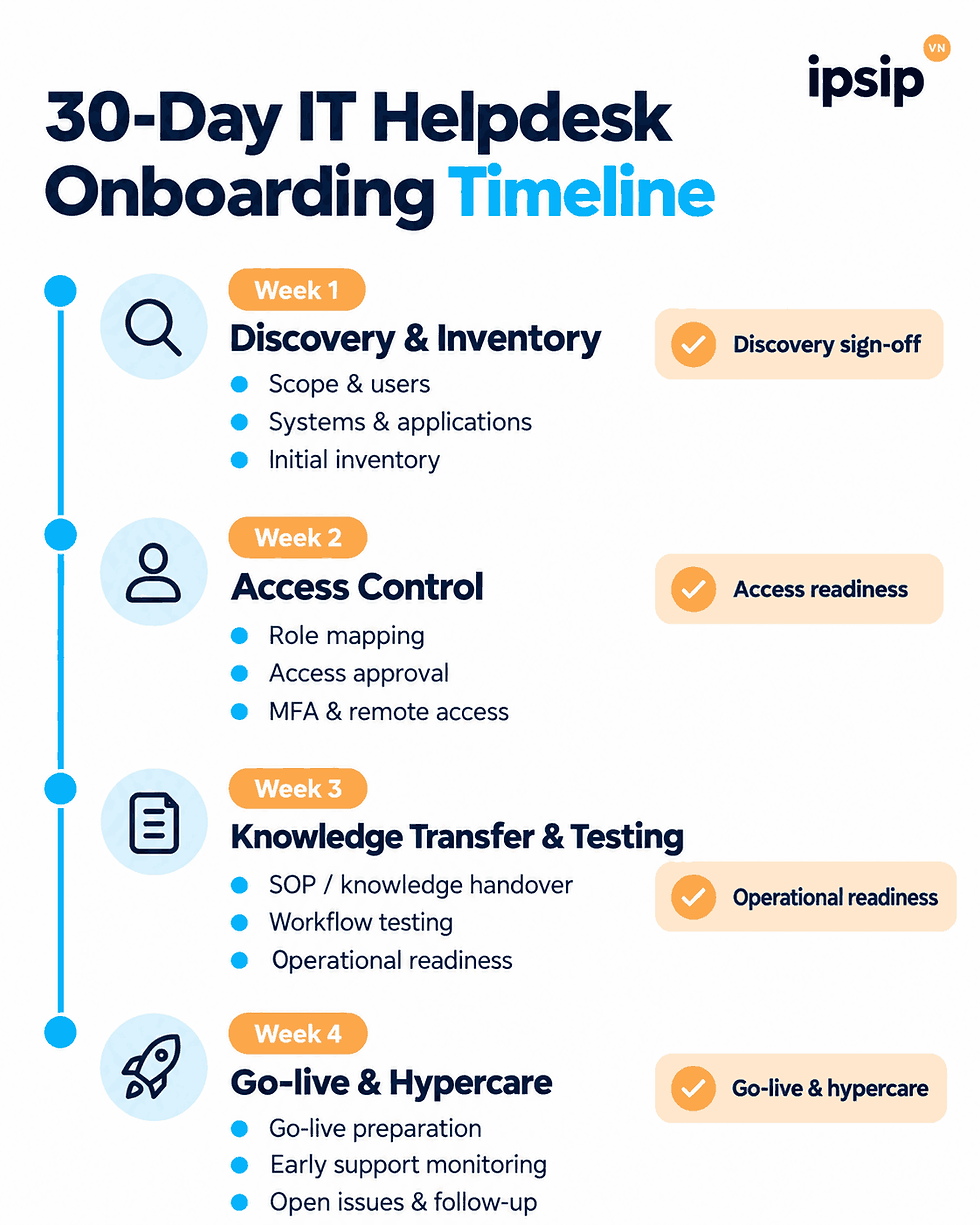
The key point is that each week should end with a readiness gate. The project should not move forward simply because the calendar has reached the next week.
Week 1 – Discovery & Inventory: understand the environment before receiving tickets
The objective of the first week is to answer one question:
Who will the Helpdesk support, what will it support, and what is explicitly outside its responsibility?
What should discovery clarify?
Typical discovery topics include:
number of users;
offices and sites;
remote or hybrid users;
support hours;
Remote/Onsite requirements;
ticket intake channels;
special user groups;
application owners;
internal IT owners;
third-party vendors;
priority model;
escalation paths.
A good onboarding process does not stop at asking “How many users do you have?”
It should understand the actual operating environment.
For example, supporting 300 users in one office can be very different from supporting 300 users across 10 sites, multiple shifts, and specialized business applications.
Inventory is more than a hardware list
An IT Helpdesk needs more than a list of laptops.
A practical inventory may include:
Data Group | Information to Hand Over |
Users | User groups, departments, locations, special support |
Devices | Laptops, desktops, mobile devices, peripherals |
Applications | Application name, owner, support boundary |
Identity | Account process, MFA, access owner |
Network | VPN, Wi-Fi, site dependencies |
Vendors | Vendor name, contact, escalation path |
Knowledge | SOPs, KB articles, known issues, workarounds |
The important point is that inventory should directly support the agreed scope.
The business does not need to hand over every piece of IT data if the Helpdesk has no operational reason to use it.
End-of-week 1 milestone: discovery sign-off
Week 1 may be considered ready to close when:
scope and exclusions are confirmed;
supported users and sites are clear;
inventory is sufficient to move into access setup;
key dependencies have owners;
known gaps are documented.
This does not necessarily need to be a formal legal acceptance document.
It is a readiness gate that prevents the project from moving into access provisioning while the scope is still unclear.
Week 2 – Access Control: Grant the Right Access, Not the Broadest Access
Access is often the most sensitive part of IT Helpdesk onboarding.
A risky shortcut is to grant broad administrator access simply to make setup faster.
Microsoft recommends a least privilege approach, where each support role receives only the permissions required for its tasks. In Remote Help, Microsoft illustrates how Level 1 support may only need limited or view-only access, while higher support tiers may require additional control. RBAC is used to restrict who can perform specific support actions.
Permissions should be mapped to tasks
For example:
Level 1 Helpdesk
password reset within approved scope;
basic account troubleshooting;
endpoint visibility;
limited remote assistance;
user guidance.
Level 2
deeper troubleshooting;
approved privilege elevation;
application-specific administration where required.
Internal IT / Security
privileged infrastructure;
security consoles;
production administration;
systems outside the provider’s scope.
Microsoft Entra also provides task-based guidance on least-privileged roles rather than defaulting to highly privileged roles such as Global Administrator.
Questions to resolve before access is granted
Will support staff use named or shared accounts?
Is MFA mandatory?
Does Level 1 need view-only or full control?
When is elevation allowed?
Which systems are explicitly restricted?
Who approves access?
Do temporary permissions expire?
Which sessions or actions must be audited?
Microsoft also recommends considering Conditional Access and MFA for helper accounts where appropriate in Remote Help scenarios.
End-of-week 2 milestone: acess readiness check
Before moving into knowledge transfer and testing, check that:
support accounts have been created;
role mappings are approved;
remote access has been tested;
MFA and Conditional Access work according to policy;
restricted systems are documented;
the escalation path for insufficient access is clear.
Week 3 – Knowledge transfer, workflow, and testing
This is the stage where the Helpdesk moves from:
“We have access”
to:
“We can support users correctly.”
Knowledge transfer should not mean sending a folder containing hundreds of documents and considering the handover complete.
PeopleCert treats Knowledge Management, Incident Management, Service Request Management, Service Level Management, and Measurement & Reporting as separate ITIL practices, reinforcing that knowledge, request handling, and reporting are capabilities that need structured management.
Which knowledge should be prioritized?
During early onboarding, focus on content likely to be used immediately:
top recurring issues;
known errors;
account and password SOPs;
onboarding and offboarding;
Microsoft 365 troubleshooting;
VPN;
printers;
application support boundaries;
vendor escalation;
VIP or special-user handling;
after-hours procedures.
The goal is not to transfer every piece of knowledge owned by internal IT.
The goal is to help the Helpdesk resolve the cases that are actually in scope and understand when it should stop troubleshooting and escalate.
Which workflows should be tested?
Before go-live, test the entire ticket lifecycle:
Ticket Creation → Classification → Priority → Assignment → SLA → Resolution/Escalation → Closure → Reopen
A successful test ticket should confirm more than simply whether a ticket can be created.
It should verify:
the correct queue;
the correct priority;
SLA behavior;
notifications;
escalation ownership;
closure information;
reporting data.
Shadowing and reverse shadowing
Where internal IT remains involved, a practical transition approach is:
Shadowing:The new Helpdesk observes internal IT handling real cases.
Then:
Reverse shadowing:The Helpdesk handles the cases while internal IT observes and corrects knowledge or process gaps.
This helps identify missing knowledge before full operational ownership is transferred.
End-of-week 3 milestone: operational readiness review
Review whether:
top request types have SOPs, KB articles, or escalation paths;
test tickets run end to end;
routing and SLA behave correctly;
L2/L3 contacts are clear;
reporting can retrieve the required data;
any critical blockers remain unresolved.
Week 4 – Go-live and hypercare: go-live Is not the end of the project
ServiceNow separates go-live, operational handover, and hypercare within its implementation methodology.
This distinction is highly relevant to IT Helpdesk onboarding.
Go-live is simply the point where the service begins receiving real workload.
What should be ready before go-live?
At minimum:
official support channels are communicated;
agent schedules are confirmed;
escalation contacts are available;
internal IT owners are identified;
known issues are documented;
fallback paths exist;
reporting ownership is clear;
open issues are tracked.
If users do not know when or where to submit requests through the new service, a technically successful go-live can still fail from an adoption perspective.
What Is hypercare for?
Hypercare is a period of closer monitoring after go-live to resolve gaps that only become visible once real workload begins.
Common areas to watch include:
incorrect routing;
missing access;
SLA configuration issues;
knowledge gaps;
user confusion;
escalation delays;
ticket backlog;
reporting problems.
Some ServiceNow implementation guidance places hypercare immediately after go-live and before steady-state operations, with go-live decisions linked to both technical and business readiness.
However, a specific hypercare duration from one ServiceNow implementation should not be treated as a universal Helpdesk standard.
The appropriate duration depends on risk, open issues, and service stability.
What data should be handed over during IT Helpdesk onboarding?
A useful principle is:
Only transfer the data the Helpdesk genuinely needs to perform the agreed scope.
Outsourcing the Helpdesk does not automatically mean the provider needs access to all IT information.
Data can be grouped into five categories.
1. User and organization data
users;
departments;
sites;
contact information;
support tiers, if applicable.
2. Asset and endpoint data
endpoints;
operating systems;
ownership;
asset types;
relevant warranty information if required.
3. Application and service data
applications;
owners;
vendors;
support boundaries;
escalation contacts.
4. Process and knowledge
SOPs;
knowledge articles;
workflows;
known issues;
escalation procedures;
approval processes.
5. Historical service data
ticket volume;
top issues;
backlog;
SLA history;
recurring categories.
Historical service data can help the new team understand expected workload, but its quality should be reviewed before it is used as a formal baseline.
Acceptance milestones should be based on readiness, not just the calendar
One of the easiest mistakes to make is treating “Day 30” as the acceptance condition.
The calendar only tells you how much time has passed.
Readiness tells you whether the service can operate safely and effectively.
A practical onboarding acceptance checklist may include:
Area | Readiness Condition |
Scope | Scope and exclusions confirmed |
Data | Inventory sufficient for operations |
Access | Correct role-based access granted and tested |
Knowledge | Top use cases have SOP/KB or escalation path |
Workflow | Ticket lifecycle tested end to end |
SLA | SLA configured and measured correctly |
Reporting | Required data can be reported |
Governance | Owners and escalation paths are clear |
Go-live | Channels and schedules are operational |
Hypercare | Open issues have owners and actions |
ServiceNow also separates operational readiness and go-live planning before handover and hypercare.
Acceptance does not have to be only pass or fail
This article proposes three practical outcomes:
Ready for steady stateKey conditions are met and the service can move into normal operations.
Ready with actionsThe service can continue, but non-blocking actions still need to be closed.
Not readyA blocker remains that affects security, service delivery, or operational capability.
These three outcomes are a framework proposed in this article, not an official taxonomy from ITIL or ServiceNow.
What can make onboarding take longer than 30 days?
This should be discussed during the commercial stage, not discovered at the end of the project.
Common dependencies include:
multiple sites;
incomplete asset or application inventory;
slow access approval;
security review;
third-party vendor dependencies;
incomplete knowledge;
tool or integration readiness;
ticket-history migration;
licensing or procurement;
incomplete UAT;
pending business-owner sign-off.
For this reason, 30 days should be treated as a target roadmap when prerequisites are reasonably ready.
If a critical integration is still unavailable or access approval is incomplete, extending onboarding may be safer than forcing go-live simply to meet the calendar.
How is onboarding different when the business already has an internal IT team?
Where internal IT remains in place, onboarding is not about transferring all IT responsibility to the provider.
The most important task is usually defining the boundary between teams.
For example:
Helpdesk
Level 1;
common service requests;
account support;
endpoint support;
user communication.
Internal IT
infrastructure;
security;
core applications;
architecture;
projects;
privileged changes.
Other application or technology vendors
backend support;
specialist troubleshooting;
product defects;
licensing-related issues.
If these boundaries are unclear, tickets can easily bounce between the Helpdesk, internal IT, and application vendors.
The article Should businesses with an internal IT team still outsource IT Helpdesk? explores this operating model in more detail.

When should SLA be finalized during onboarding?
SLA should not be left until after go-live.
At the same time, targets should not be defined only from preference without considering scope, support hours, and dependencies.
During onboarding, both parties should clarify:
priority definitions;
response targets;
resolution targets where appropriate;
support calendars;
pause conditions;
escalation;
exclusions;
dependencies.
For a deeper explanation of SLA design, see IT Helpdesk SLA: A Foundation for Uninterrupted Operations.
How does IPSIP Vietnam support IT Helpdesk onboarding?
An onboarding roadmap only works when it reflects the real operating environment.
User volume, number of sites, supported systems, security policies, inventory quality, and knowledge readiness can all change how the transition should be structured.

For businesses preparing to move to an outsourced Helpdesk model, IPSIP can work with the organization to review areas such as:
support scope;
users and sites;
inventory;
Remote/Onsite requirements;
access model;
SLA;
knowledge;
escalation;
reporting;
go-live readiness.
Where internal IT remains in place, onboarding should also define how tickets move between the Helpdesk and internal owners so that the new service does not create unnecessary coordination layers.
Businesses can review IPSIP’s IT Helpdesk & IT Support service to understand the broader service scope before building a specific transition roadmap.
If a business is preparing to move to an outsourced IT Helpdesk model, a practical first step is to assess the current environment and identify dependencies that must be resolved before go-live. Based on support scope, systems, access requirements, and data readiness, IPSIP Vietnam can work with the business to shape an implementation roadmap and quotation that reflect the actual environment rather than applying the same fixed 30-day timeline to every organization.
Referneces


