
Joiner - Mover - Leaver process in IT Helpdesk: Provisioning, modifying, and revoking employee access

A new employee has started working but lacks the necessary email account, software, or equipment. An employee transferring departments retains access to the old department's data. A person who has left the company still has an active SaaS or VPN account. These are scenarios that can occur when HR information and IT operations are not connected through a unified process.
The Joiner - Mover - Leaver (JML) process helps businesses manage the entire access lifecycle of an employee, from onboarding (Joiner), role changing (Mover) to offboarding (Leaver). Each change needs to be notified by HR, approved by an authorized person, executed by the IT Helpdesk, and recorded with proof of completion.
The goal is not only faster access provisioning but also limiting orphaned accounts, residual access rights, and accountability gaps between departments.
What is the Joiner - Mover - Leaver (JML) process in IT Helpdesk and why do businesses need to standardize it?
Joiner – Mover – Leaver is the process of managing changes in accounts, access rights, and IT equipment according to the employee's working lifecycle.
The process consists of three stages:
Joiner: Creating accounts, granting application usage rights, and preparing equipment for new employees.
Mover: Adjusting rights when an employee transfers departments, changes positions, or takes on new responsibilities.
Leaver: Disabling accounts, revoking access rights, processing work data, and handing over equipment.
The three stages have different requirements but share one principle: all access changes must originate from a valid request, have appropriate approval, and be confirmed after execution.
Why does manual processing easily entail risks?
In many operational models, HR manages personnel information, Managers determine job requirements, while IT handles accounts and equipment. When departments lack a clear coordination flow, information is easily delayed or missing.
For instance, HR notifies of an employee's departure via email but does not specify the exact time to terminate access. IT might lock the email account but miss SaaS applications that use separate login credentials.
As a result, an account with no valid user remains active, causing difficulties for management and security auditing.
According to CIS Controls v8 – Safeguard 6.1 và 6.2, organizations need to establish a process for granting and revoking access when personnel join, change roles, or terminate employment.
Therefore, standardizing JML should be considered a part of daily IT operations, not just an account administration task. Businesses can learn more about the role of IT Helpdesk in user support and IT operations to determine the appropriate scope of work.
HR Trigger: The starting point of the JML process
An effective JML process must start from a formally recorded personnel event, rather than waiting for an employee or manager to discover missing access and then request IT to handle it.
An HR trigger is a notification sent when there is a decision regarding hiring, transferring, changing responsibilities, or terminating employment. This notification activates the corresponding IT tasks.
What information does HR need to provide?
For the IT Helpdesk to process accurately, the minimum requirements should include:
Employee ID or unique internal identifier.
Full name, department, and job title.
Direct manager or the person responsible for confirmation.
Request type: Joiner, Mover, or Leaver.
Date and time the change takes effect.
Work location and equipment needs.
Specific information necessary for processing access rights.
For Mover, HR needs to clearly state the old role and the new role. For Leaver, the time of access termination must be defined precisely enough, especially for cases requiring emergency handling.
Information unrelated to provisioning access, such as personal reasons for leaving, should not be automatically shared widely with the Helpdesk.
Who approves and who executes?
HR does not necessarily have the authority to decide whether an employee can access all applications. Similarly, the IT Helpdesk should not self-provision sensitive access based solely on a request message.
Proposed assignment model:
HR: Confirms the personnel event, official information, and effective time.
Manager: Confirms access needs appropriate to the position and job tasks.
System Owner: Approves special access rights or sensitive data according to policy.
IT Helpdesk: Verifies the request, executes technical changes, updates the ticket, and saves evidence.
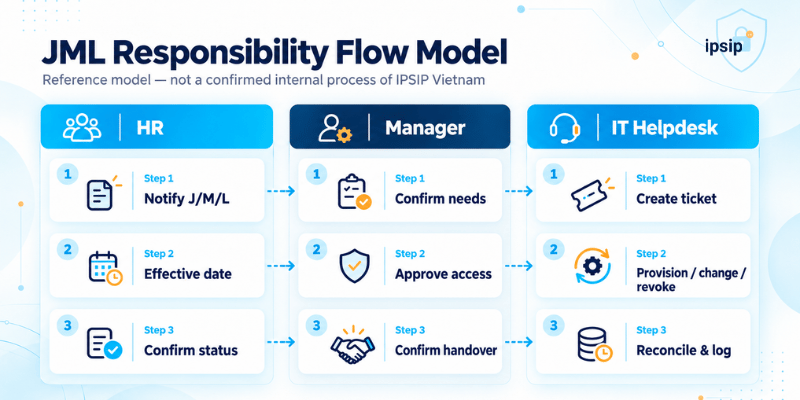
Process flow:
HR generates a Joiner, Mover, or Leaver notification.
The Helpdesk receives and creates a ticket based on the employee identifier.
The Manager confirms the need or scope of access changes.
The System Owner provides additional approval if needed.
IT provisions, adjusts, or revokes access.
IT verifies the results and records evidence.
The responsible person confirms completion before closing the ticket.
Cases with insufficient information or pending approval must have a clear waiting status, a person responsible for further processing, and an escalation mechanism when overdue.
Specifically for emergency access revocation requests, businesses need a pre-approved process so as not to depend on waiting for standard provisioning approval.
Joiner: Provisioning accounts and equipment process for new employees
The Joiner stage determines whether an employee can start working on time.
An effective employee account onboarding process requires coordination between HR, the Manager, and IT prior to the first working day, while ensuring that the access granted is appropriate for actual needs.
Step 1: Receiving the request and verifying information
The IT Helpdesk receives the ticket from HR, verifying the employee identifier, start date, department, and approver.
If the information is incomplete, the ticket must be returned for supplementation before performing operations that require approval.
Step 2: Determining access based on role
The Manager confirms the applications, access groups, and resources the employee needs to use.
For example, a sales employee may need corporate email, Customer Relationship Management (CRM), and the sales document folder, but does not implicitly need access to the accounting system or HR data.
A crucial principle is only granting the access necessary to perform tasks, rather than copying all the access rights of another employee without review.
Step 3: Creating accounts and configuring access
Depending on the business infrastructure, IT may need to:
Create or activate corporate identity accounts.
Provision email and approved applications.
Add the employee to the appropriate permission groups.
Set up Multi-Factor Authentication (MFA) where applicable.
Configure VPN access or internal resources if the job requires it.
Accounts outside the centralized login system need to be recorded separately to avoid being overlooked when the employee changes roles or leaves the company.
Step 4: Preparing and handing over equipment
An created account does not mean the employee is ready to work.
IT needs to prepare the computer, install necessary software, check security configurations, and associate the equipment with the user profile.
The handover record should note the asset code, equipment condition, accompanying accessories, and the recipient.
Step 5: Testing actual usability
The Helpdesk must verify that the employee can log into essential applications and has access within the approved scope.
If an application is not yet licensed or an account is not yet active, the ticket needs to reflect the pending item and the person in charge.
Joiner completion criteria: The employee has all the approved accounts, access rights, and equipment, with a confirmed handover, and there are no errors hindering main tasks within the scope of the request.
Mover: Role changes must be accompanied by reviewing and revoking old access
Mover is often an easily overlooked stage in the IT joiner mover leaver process.
When an employee transfers departments, businesses tend to focus on provisioning access for the new position while forgetting to review existing access. After multiple transfers, a person may accumulate access rights that exceed their current job needs.
Not just granting new access
Suppose an employee transfers from the sales department to the operations department.
Under the new role, the employee needs access to the operations management system but may no longer need permission to view all CRM data of the sales department.
If IT only adds new access, the unnecessary old access remains.
To prevent this situation, a Mover request needs to identify three groups of access rights:
Retained Access: Still necessary in the new job.
Added Access: Serving the new task and already approved.
Revoked Access: No longer needed or no longer suitable for current responsibilities.
Mover processing steps
Step 1: HR sends a transfer notice along with the effective date.
Step 2: The new Manager determines the necessary access for the new position.
Step 3: The old Manager or the System Owner coordinates to identify old access that needs revoking.
Step 4: The IT Helpdesk reconciles current access against approved access.
Step 5: IT executes the addition and revocation of access according to the agreed timeframe.
Step 6: Verify results, log exceptions, and close the ticket after completing the reconciliation.
In cases where an employee needs to retain some old access to hand over work, that access should have a clear reason, an approver, and an expiration date. Temporary access should not be allowed to exist indefinitely.
This aligns with the PS-5 Personnel Transfer control in NIST SP 800-53 Rev. 5, which emphasizes reviewing current access needs and adjusting privileges when personnel are reassigned to another position.
Mover completion criteria: The employee can utilize resources serving the new role, unnecessary old access has been revoked, and any exceptions have a controlled timeframe.
Leaver: Employee account offboarding and access revocation process upon departure
Leaver is an especially critical stage for access control. An employee may have completed the offboarding procedures with HR but still have active accounts on corporate systems.
Therefore, IT offboarding should not just stop at retrieving computers or locking email accounts.
Accurately determining the time of access termination
HR must notify the effective date and time of departure, along with the type of scenario to be handled.
For planned departures, IT can prepare a list of accounts, access rights, and equipment to be processed prior to the agreed time.
For emergency terminations, the process must have a clear decision point to disable access promptly, without waiting to complete the entire standard handover procedure.
Revoking access on related systems
The IT Helpdesk needs to cross-reference the list of managed accounts, including:
Corporate login accounts and email.
VPN, Remote Desktop, and remote access methods.
SaaS applications, CRM, and business software.
Shared folders, storage systems, and permission groups.
Separate administrative accounts or special privileges granted.
Applications not using centralized login.
Access to partner systems if within the scope managed by the business.
Beyond disabling accounts, IT should consider revoking login sessions, tokens, access keys, and related authentication methods according to the capabilities of each system.
One point to note is that locking the centralized identity account does not implicitly guarantee that all external applications have ceased access.
Processing equipment and work data
Equipment issued to the employee needs to be recovered, inspected, and updated with its status in the asset management system.
Regarding work data, the business must determine who has the right to receive emails, files, or resources currently managed by the employee.
The transfer must follow policy and appropriate approval, avoiding arbitrarily opening all personal data or information unnecessary for handover purposes.
Accounts also do not necessarily need to be deleted immediately upon departure. In some cases, businesses need to disable access but continue retaining records or logs within the allowable timeframe.
CIS Controls – Safeguard 6.2 also notes that disabling rather than deleting accounts may be necessary to preserve the audit trail.
How to avoid orphaned accounts?
An orphaned account is an account that still exists but is no longer associated with a valid user or managing entity, or is no longer properly managed.
To limit this situation, businesses should periodically reconcile the list of active employees from HR with the list of accounts on critical systems.
Mismatched accounts need to be investigated, their owners identified, and processed according to policy.
Specifically, shared accounts, service accounts, or accounts previously managed by former employees require separate review, rather than being deleted or disabled en masse without impact assessment.
Leaver completion criteria: Access rights within the defined scope have been disabled or revoked on time; equipment and work data are processed according to regulations; any remaining exceptions have a person in charge and a resolution timeframe.
Audit Trail: How to prove access was provisioned, modified, or revoked correctly?
A JML process cannot be fully evaluated based solely on a "Completed" ticket status.
Businesses need to know who requested it, who approved it, what IT executed, when, and whether the results were verified.
This is the role of an audit trail, which is the sequence of records and traces allowing the processing history to be tracked.
Information to record in a JML ticket
A ticket should be able to link the following information:
Ticket ID and employee ID.
Request type: Joiner, Mover, or Leaver.
Notification or basis for the request from HR.
Approver and approval time.
List of systems and access rights needing change.
Executor and execution time.
Execution results on each system.
Verification evidence and exception status.
Person confirming acceptance and ticket closure time.
Depending on the tools and security policies, evidence can be an access change record, system log, automated task code, or verification confirmation by the responsible person.
Passwords, MFA recovery codes, tokens, or unnecessary sensitive information should not be included in the ticket.
JML acceptance checklist
Reference checklist to apply before closing a ticket:
|
The checklist needs adjusting according to the request type. For instance, Joiner has equipment handover criteria, while Leaver focuses on access revocation and asset processing confirmation.
For access that cannot be immediately revoked due to dependence on vendors or external systems, the ticket should be kept in an appropriate status and clearly state risk mitigation measures.
How to integrate the JML process into Helpdesk operations?
After designing the JML steps, businesses need to turn the process into an executable and daily-monitored activity.
If requests are still sent in a scattered manner via personal emails or chat groups without a central tracking point, controlling deadlines and responsibilities will be highly difficult.
Standardizing tickets and SLA for each stage
The Helpdesk system should have three separate request types: Joiner, Mover, and Leaver, with corresponding forms, approvers, and acceptance criteria.
The processing objectives are not necessarily the same.
Joiner needs to be completed early enough for the employee to work as planned. Mover needs to synchronize adding new access with revoking old access. Leaver must prioritize the time of access termination, especially in emergencies.
Businesses can apply IT Helpdesk Service Level Agreements (SLAs) to determine response, processing, and escalation times for requests. However, SLAs must distinguish the time the Helpdesk proactively processes from the waiting time for HR, the Manager, or the System Owner's approval.

Monitoring effectiveness through three KPIs
To evaluate the process, businesses can start with three Key Performance Indicators (KPIs):
1. On-time ready Joiner rate
The number of Joiner requests that complete essential items before the committed time, divided by the total number of valid Joiner requests in the period.
2. On-time Leaver access revocation rate
The number of Leaver cases that complete revoking access within the controlled scope before or at the specified deadline, divided by the total number of due cases.
3. Old access reviewed Mover rate
The number of Mover requests with evidence of old access review and processing, divided by the total number of Mover requests to be executed in the period.
The KPIs require standardized definitions of valid requests, calculation start times, and exceptions to avoid misjudging effectiveness.
When businesses have in-house IT or use outsourced Helpdesk
The JML process is not required to be executed entirely by a single IT group.
In a hybrid model, HR and the Manager are still responsible for the personnel data source and approvals. In-house IT can retain control over critical systems, while the outsourced Helpdesk performs delegated tasks and records tickets.
The crucial point is that the vendor must not independently decide on sensitive access beyond the agreed-upon authority.
Businesses can refer to coordination plans between in-house IT and outsourced IT Helpdesk to determine the scope of delegation and management responsibilities.
If preparing to onboard a new Helpdesk vendor into operations, businesses also need to agree on account data, approval processes, and acceptance milestones. These contents are presented in more detail in the guide to onboarding IT Helpdesk services in 30 days.

Standardizing access provisioning and revocation processes with IPSIP Vietnam
If your business is struggling with HR–IT coordination, managing employee accounts, or tracking support requests, IPSIP's IT Helpdesk services could be an option to standardize the reception, assignment, and processing of tickets according to appropriate SLAs.
To effectively implement the JML process, businesses need to focus on three elements: accurate personnel triggers, clear approval and execution responsibilities, and verification evidence after every change.
When these elements are integrated into the ticket system and SLAs, businesses can reduce slow access provisioning, limit residual access, and enhance account control capabilities throughout the employee lifecycle.
References:
1. CIS Critical Security Controls v8 – Control 6, Access Control Management
2. NIST SP 800-53 Rev. 5 – Security and Privacy Controls for Information Systems and Organizations


