How to calculate TCO and ROI for outsourced IT Helpdesk: a CFO template

IT Helpdesk TCO should be calculated by comparing the full operating cost of the in-house and outsourced models on the same service scope. The CFO can then use the TCO difference to calculate Net Benefit, ROI, and Payback Period. The key is to include people, tools, downtime, transition costs, retained IT, and vendor management instead of comparing employee salaries with the service fee alone.
This is also why two options with similar monthly costs may still have very different total economics.
An in-house Helpdesk may appear less expensive if the calculation only includes salaries while ignoring recruitment, leave coverage, ITSM tools, management overhead, or the time spent by Level 2 and Level 3 specialists on escalations.
An outsourced option may have a clear monthly fee but still require transition work, onsite support, after-hours coverage, retained internal IT, or change requests.
The more useful question for a CFO is therefore not: “How much cheaper is outsourcing?”
It is: “What is the total cost of each model under the same service scope, which benefits can actually be quantified, and how long will it take to recover the transition investment?”

Why comparing internal IT salaries with vendor fees is not enough?
Suppose a business currently has two internal Helpdesk employees and is considering outsourcing.
If the calculation compares only the salaries of those two employees with the vendor quote, several cost categories are likely to be missing.
An in-house Helpdesk may include:
salaries;
employer contributions;
bonuses and allowances;
recruitment;
onboarding and training;
overtime;
leave coverage;
ITSM platforms;
remote-support tools;
management time;
reporting effort;
Level 2/Level 3 escalation support.
An outsourced Helpdesk may include:
recurring service fees;
onsite services;
after-hours coverage;
transition;
retained internal IT;
vendor governance;
additional tools;
change requests;
exit costs.
This is why outsourcing should be evaluated as a lifecycle covering scope design, transition, operations, governance, and eventual exit rather than simply as a monthly support package.
If the organization is still defining what the Helpdesk should own, the article on IT Helpdesk & IT Support for businesses can help establish the service scope before building the TCO model.

Step 1: Build the In-house IT Helpdesk TCO Baseline
A simple starting formula is:
In-house TCO = People + Tools + Recruitment + Management + Downtime + Other Operating Costs
The model should use the same evaluation period across all scenarios, such as 12 months or three years.
People costs
This is usually one of the largest cost categories, but it should include more than base salary.
Possible components include:
gross salary;
employer contributions;
bonuses and allowances;
overtime;
training;
leave coverage;
backup resources.
If user support is only part of an IT Generalist or Infrastructure Engineer’s responsibilities, allocate the proportion of time actually spent on Helpdesk work instead of counting the full salary or ignoring it entirely.
Recruitment and replacement costs
An internal Helpdesk also carries cost when staff need to be recruited or replaced.
Possible items include:
recruiters or agencies;
HR time;
interview time from IT managers;
onboarding;
training;
productivity ramp-up;
vacancy periods.
There is no need to use an external turnover benchmark if the business already has its own historical data.
For a CFO model, internal operating data is usually more useful than a generic industry average that may not match the company’s environment.
Tools and licenses
Commonly overlooked costs may include:
ITSM/helpdesk software;
remote-support tools;
endpoint management;
monitoring;
knowledge-management platforms;
telephony;
reporting;
automation.
If these tools are also used by other IT teams, only the Helpdesk-related portion should be allocated to this model.
Management overhead
An internal Helpdesk still needs someone to:
assign workload;
review KPIs;
manage escalations;
prepare reporting;
coordinate vendors;
review backlog;
manage schedules.
If an IT Manager spends part of their time managing Helpdesk operations, that effort is part of the Helpdesk TCO.
Downtime and productivity loss
This is one of the easiest areas to overstate.
A business should not take an internet benchmark such as “one minute of downtime costs X dollars” and apply it directly.
A more defensible internal model is:
Downtime Cost = Affected Users × Lost Time × Loaded Labor Cost × Productivity Factor
For example, if 40 employees cannot work for 30 minutes, the company may use its own loaded labor cost to estimate the productivity impact.
However, not all IT downtime can be attributed to Helpdesk performance.
Step 2: Calculate the TCO of an outsourced IT Helpdesk
A general formula is:
Outsourced TCO = Service Fee + Transition + Retained IT + Vendor Management + Tools/Add-ons + Change/Risk Costs
Service Fees
The recurring service fee should be tied to a clearly defined scope.
For example:
number of users;
number of sites;
support hours;
Remote/Onsite coverage;
SLA;
intake channels;
reporting;
escalation scope.
If Vendor A provides remote 8x5 support while Vendor B includes onsite support and extended hours, the two quotes should not be compared directly.
Transition costs
Transition costs typically occur before or around go-live.
They may include:
discovery;
inventory cleanup;
knowledge transfer;
access setup;
tool configuration;
ticket migration;
user communication;
testing;
hypercare.
Transition costs are not necessarily charges from the vendor. Some of them may be internal IT effort.
Retained IT costs
This is an important cost category that is often missed.
Outsourcing the Helpdesk does not mean internal IT cost falls to zero.
The business may still need:
infrastructure teams;
cybersecurity;
application owners;
architecture;
procurement;
IT management;
vendor governance.
For organizations that already have internal IT and are considering outsourcing Level 1 support, see Should businesses with internal IT still outsource IT Helpdesk?.

Vendor management
The contract still needs to be managed after signing.
Activities may include:
service reviews;
SLA reviews;
invoice validation;
escalation;
contract changes;
renewal;
issue management.
A low-cost vendor that requires significant internal effort to manage may not necessarily have the lowest TCO.
Add-ons and change costs
The business should clarify how the provider prices:
after-hours support;
onsite dispatch;
users above the contracted scope;
new sites;
project work;
custom reports;
integrations;
major changes.
If these items are likely to occur regularly, they should be represented in at least one scenario instead of being assumed to be zero.
Step 3: Include downtime in TCO wwithout inflating ROI
Downtime is a legitimate cost driver, but only when attribution is reasonable.
The IT Helpdesk may directly affect:
response delays;
time users wait for support;
escalation speed;
recurring end-user issues;
backlog-related delays.
The IT Helpdesk does not fully control:
power outages;
ISP outages;
SaaS outages;
core infrastructure failures;
cyberattacks;
third-party application failures.
Therefore, if the business case includes benefits from downtime reduction, it should use only the portion that can reasonably be attributed to support operations.
For example, if an ERP outage lasts three hours because of a database failure, the entire three-hour outage should not be counted as a benefit that outsourcing Helpdesk could eliminate.
IT Helpdesk may improve intake, communication, and escalation time, but it does not control the underlying database failure.
Step 4: How to Calculate ROI for outsourced IT Helpdesk
Once both TCO baselines are available, the business can move to ROI.
A simple approach is:
Annual Benefit = In-house TCO − Outsourced Run-rate TCO
If the project also has transition investment, the model should be more explicit:
Net Benefit = Avoided Costs + Quantified Benefits − Outsourcing Costs − Transition Costs
Then:
ROI = Net Benefit ÷ Investment Cost × 100%
The difficult part is not the formula itself.
The difficult part is agreeing on what counts as a benefit and what counts as an investment.
For example:
Is avoided recruitment cost counted as a benefit?
Is productivity improvement measurable enough to monetize?
Is transition cost treated as a one-time investment or amortized?
Has retained internal IT already been included?
Which tools are already included in the vendor fee?
Without clear assumptions, a statement such as “ROI = 42%” has limited decision-making value.
Step 5: Payback period - how long until the transition cost is recovered?
ROI shows the relative return. Payback Period answers a different question:
How long does it take for accumulated benefits to recover the initial transition investment?
Where monthly benefits are relatively stable:
Payback Period = Initial Transition Cost ÷ Monthly Net Benefit
For example:
Transition Cost: Input
Monthly Net Benefit: Input
Payback Period: Formula
There is no need to insert an industry benchmark.
If the monthly benefit changes over time, it is better to calculate cumulative cash flow month by month instead of using a simple division.
This is particularly useful if the first few months include higher hypercare or parallel-run costs before the service reaches steady state.
Step 6: Use three scenarios instead of one forecast
A strong CFO business case should not assume the future has only one possible outcome.
A practical model can use three scenarios:
Variable | Conservative | Base Case | Upside |
In-house TCO | Input | Input | Input |
Vendor run-rate | Input | Input | Input |
Transition cost | Input | Input | Input |
Retained IT | Input | Input | Input |
Attributable downtime benefit | Input | Input | Input |
Annual net benefit | Formula | Formula | Formula |
ROI | Formula | Formula | Formula |
Payback | Formula | Formula | Formula |
In the Conservative Case, the business may assume:
higher transition cost;
lower downtime benefit;
more add-ons;
slower operational improvement.
The Base Case should use the most likely assumptions.
The Upside Case may reflect stronger productivity, coverage, or operational improvements.
The scenarios should not be designed by changing numbers arbitrarily to make the preferred option look attractive.
Each assumption should have a reason.
What should an IT Helpdesk TCO template for CFOs include?
A practical worksheet can be divided into two sections:
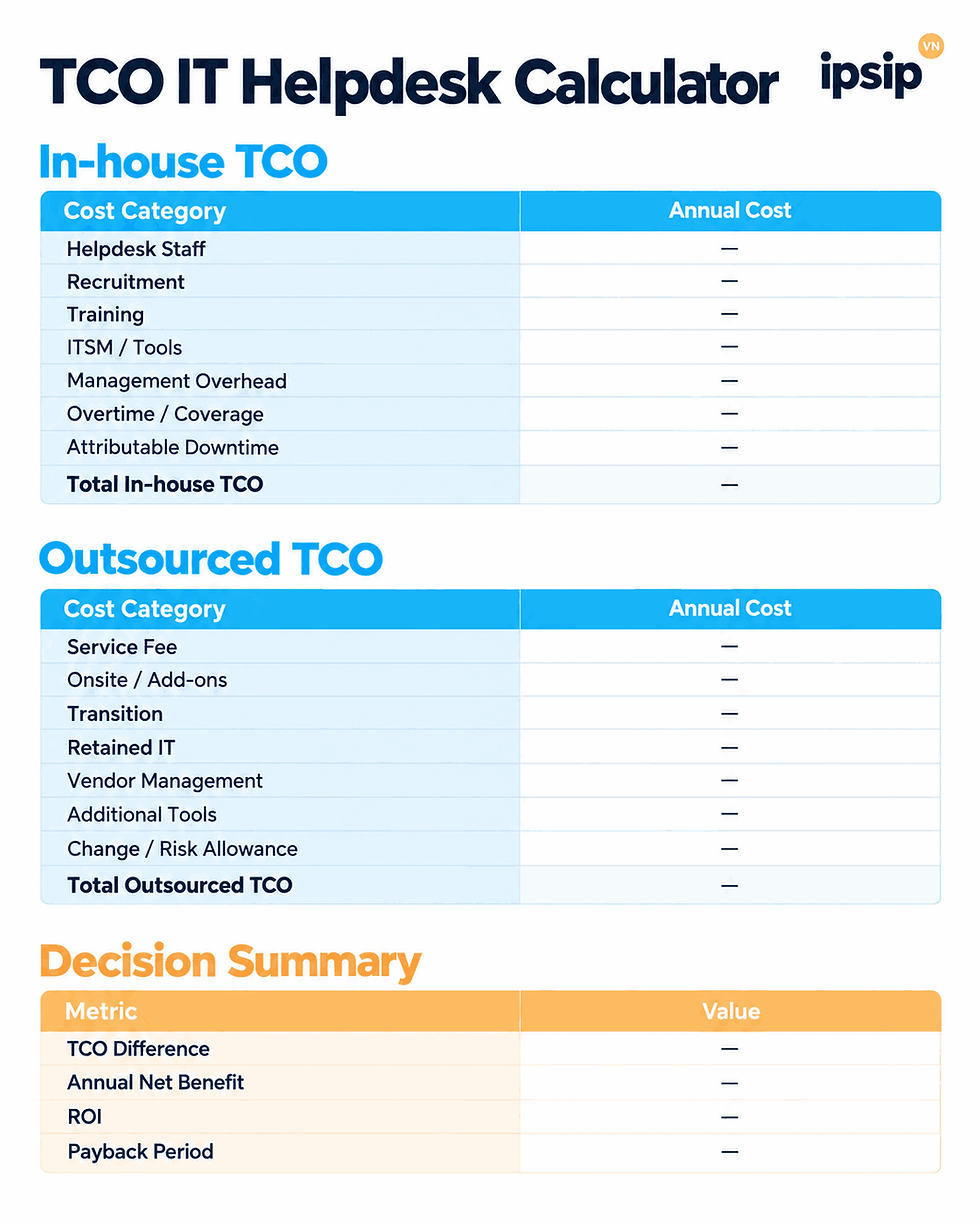
Then calculate:
TCO Difference = In-house TCO − Outsourced TCO
But keep in mind:
TCO Difference is not the same as ROI.
TCO Difference measures the total cost difference between the two operating scenarios.
ROI evaluates the benefit relative to investment.
Payback measures how long it takes to recover the investment.
The three metrics are related, but they are not interchangeable.
Which benefits should not be forced into a dollar value?
A business case does not need to monetize everything.
Some benefits can remain qualitative or non-financial, including:
broader support coverage;
better SLA visibility;
clearer reporting;
a single point of contact;
easier scaling;
knowledge continuity;
improved user experience;
reduced dependency on one individual;
stronger governance.
Trying to convert every benefit into money can make the model less credible.
For example, assigning a specific annual dollar amount to “better user experience” without a clear methodology may create more questions than value.
A CFO model can separate: Quantified BenefitsfromStrategic/Operational Benefits
instead of forcing every outcome into the ROI calculation.
When can outsourcing have a lower TCO but still be the wrong choice?
A lower TCO is a positive signal. It is not an automatic decision.
The business may still need to assess:
security requirements;
data sensitivity;
vendor concentration risk;
knowledge retention;
SLA fit;
business criticality;
transition risk;
exit terms;
contractual flexibility.
For example, a provider may show a lower TCO but still be unsuitable if the SLA does not support 24/7 operations or the exit conditions create unacceptable risk.
TCO is therefore a decision input, not the entire decision.
How should TCO be used to compare IT Helpdesk vendors?
Another common mistake is comparing vendor TCO when the proposals are based on different baselines.
Before comparing suppliers, Finance or Procurement should normalize at least:
user count;
number of sites;
support hours;
Remote/Onsite scope;
SLA;
supported systems;
tools;
reporting;
exclusions;
transition scope.
For example: Vendor A excludes onsite support. Vendor B includes four onsite visits per month.
Without normalization, Vendor A may appear cheaper even though the two proposals are not for the same service.
SLA also affects staffing and pricing. For more detail on this area, see IT Helpdesk SLA.
How does IPSIP Vietnam support businesses in building an IT Helpdesk business case?
A TCO model is only useful when the assumptions reflect the real operating environment.
User volume, number of sites, support hours, systems in scope, onsite requirements, SLA, and the role of internal IT can all change the cost structure.

For businesses considering outsourced Helpdesk services, IPSIP Vietnam can help review areas such as:
the current support model;
users and sites;
support hours;
Remote/Onsite requirements;
system scope;
SLA;
escalation;
retained internal IT;
reporting;
transition requirements.
From there, the business can build a clearer outsourced scenario for its TCO model instead of comparing costs against an undefined service package.
Businesses can review IPSIP Vietnam’s IT Helpdesk & IT Support service to understand the support scope and the cost components that may need to be included in the business case.
If a business is preparing to compare an internal Helpdesk with an outsourced model, a practical first step is to assess requirements and standardize the current baseline before calculating ROI. Based on scope, coverage, SLA, and existing IT resources, IPSIP can provide a proposed service model and quotation that the business can use in its own TCO/ROI analysis instead of applying one fixed savings percentage to every organization.
References